
Most businesses configured Odoo for VAT and assumed Corporate Tax would follow the same pattern. It does not. VAT lives on transactions; Corporate Tax is an annual view of adjusted profit, and your chart of accounts either supports that or makes every filing painful.
UAE Corporate Tax applies to financial years beginning on or after 1 June 2023, at a headline rate of 9% on taxable income above AED 375,000, with 0% below that threshold. Free zone entities meeting the qualifying conditions may access a 0% rate on qualifying income — a determination that depends on your specific circumstances and is worth confirming with a tax advisor rather than assuming.
This piece is about the system side: what to configure in Odoo so the annual return is a report you run rather than a reconciliation you dread.
Why VAT configuration does not carry over
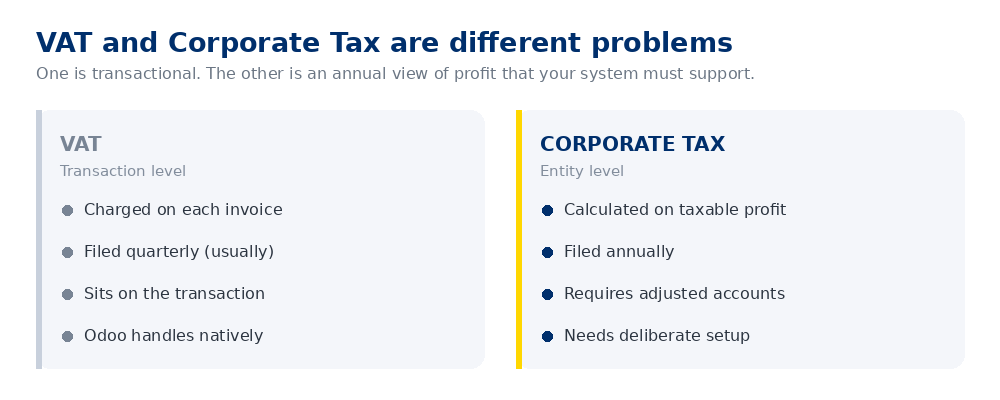
VAT is mechanical. Each invoice carries a tax code, Odoo aggregates them, you file. Corporate Tax starts from accounting profit and applies a series of adjustments — disallowed expenses, exempt income, related party considerations — to arrive at taxable income.
Odoo does not perform those adjustments for you. What it can do, if configured properly, is make the underlying numbers available cleanly enough that the adjustments are straightforward rather than forensic.
What to configure
1. A chart of accounts that separates what tax treats differently
The single highest-value change. If entertainment expenses sit inside a general "Office Expenses" account, someone spends days at year end pulling them apart. Give the categories that receive distinct tax treatment their own accounts from the outset:
- Entertainment expenses (partially disallowed)
- Fines and penalties (disallowed)
- Donations to non-approved bodies (disallowed)
- Related party transactions
- Interest expense, where limitation rules may apply
- Depreciation, separated by asset class
None of this is exotic. It is simply anticipating the questions the return will ask.
2. Analytic accounting for free zone entities
If you are a free zone entity potentially accessing the 0% rate on qualifying income, you need to demonstrate the split between qualifying and non-qualifying income. Odoo's analytic accounting handles this cleanly — tag revenue at the point of entry and the split reports itself.
Retrofitting that classification across a full year of transactions is considerably less pleasant.
3. Fiscal year alignment
Your Odoo fiscal year must match your Corporate Tax period. Obvious, and still a common misconfiguration in systems that were set up before the tax existed.
4. Related party identification
Transactions with related parties require disclosure and, above certain thresholds, transfer pricing documentation. Flag related party contacts in Odoo so those transactions can be extracted rather than remembered.
Groups operating across the UAE, KSA and Pakistan should pay particular attention here. Intercompany transactions between entities in different jurisdictions carry both transfer pricing and tax residence implications. If your group runs a revenue-sharing arrangement between entities, that arrangement needs to be documented and defensible, not simply booked.
5. Fixed asset register
Depreciation is one of the more common adjustment areas. Odoo's asset management gives you a proper register with schedules by class — considerably better than the spreadsheet most SMEs are still using.
What Odoo will not do
Worth being direct, because there is some optimistic marketing on this point.
Odoo does not calculate your Corporate Tax liability. It does not apply the adjustments, determine free zone qualifying status, produce the return, or file it. Those are advisory judgements, not system outputs.
What a well-configured Odoo gives you is a clean, categorised, auditable set of accounts from which your advisor can prepare the return efficiently. That is the realistic objective, and it is worth a great deal — the difference between a two-day exercise and a three-week one.
If you are configuring now
- Review your chart of accounts against the categories that receive distinct tax treatment. Split what needs splitting before the year progresses further.
- Set up analytic tags for qualifying versus non-qualifying income if you are a free zone entity.
- Flag related parties in your contact records.
- Move fixed assets into Odoo's asset register rather than a spreadsheet.
- Agree the year-end pack with your advisor now — which reports they want, in what format — and build those reports once rather than improvising annually.
This is general guidance, not tax advice. UAE Corporate Tax rules, thresholds and free zone conditions are subject to change and depend heavily on your specific circumstances. Confirm your position with a qualified tax advisor or the Federal Tax Authority.
Retrofitting an existing system
If Odoo is already live and configured without this in mind, it is fixable. Splitting accounts and adding analytic structure mid-year is straightforward; the awkward part is reclassifying transactions already posted.
Our usual approach is to configure correctly from the next period and reclassify the current year's material items only — full historical reclassification is rarely worth the effort. This work typically sits within finance and compliance advisory rather than a full implementation.
Is your chart of accounts ready for the return?
A 30-minute review of how your Odoo is structured and what would make the annual filing straightforward.
Book a discovery call