
Phase 1 asked you to issue invoices electronically. Phase 2 asks your system to talk to ZATCA directly, in real time, in a format that must be exactly right. If your ERP cannot do that by your wave date, you cannot legally issue invoices.
Prefer video? Watch one-minute Odoo explainers in English, Arabic and Urdu on our YouTube channel.
Saudi Arabia's e-invoicing programme has moved in two stages. The first was largely a formatting exercise and most businesses absorbed it without much difficulty. The second is an integration project, and it catches out companies who assume their existing accounting system will simply be updated by its vendor.
This piece sets out what Phase 2 actually requires, how the waves work, and what to check in your own system before the deadline rather than after it.
What changed between the phases
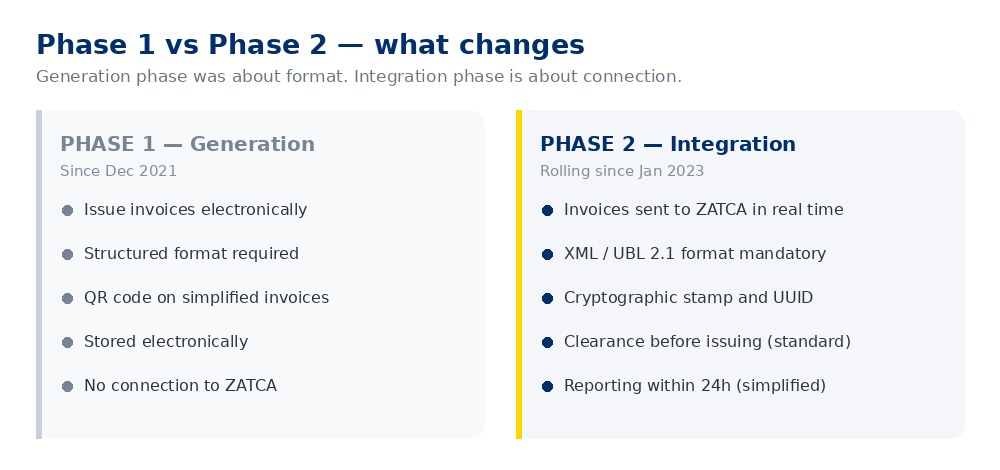
Under Phase 1, in force since December 2021, you had to issue invoices electronically in a structured format, add a QR code to simplified invoices, and store them digitally. Nothing left your system.
Phase 2 changes that fundamentally. Your system must now connect to ZATCA's platform and, depending on invoice type, either obtain clearance before the invoice is valid or report it within twenty-four hours.
Standard invoices — clearance model
B2B and B2G invoices must be transmitted to ZATCA before you give them to the customer. ZATCA validates the invoice, applies its own cryptographic stamp, and returns it. Only the cleared version is a legally valid invoice. If clearance fails, you have no invoice.
Simplified invoices — reporting model
B2C invoices are issued to the customer immediately with a compliant QR code, then reported to ZATCA within twenty-four hours. Less disruptive to point of sale, but the technical requirements on the invoice itself are the same.
Which wave applies to you
ZATCA has phased Phase 2 by annual revenue, announcing waves in sequence and notifying affected taxpayers at least six months in advance. Early waves covered the largest taxpayers; successive waves have progressively lowered the revenue threshold, and the programme continues to extend down toward smaller businesses.
Check your own status directly. Wave thresholds and dates have been revised several times, and any figure quoted in an article ages quickly. Confirm your wave and compliance date on ZATCA's Fatoora portal, or through your tax advisor. Do not rely on a summary — including this one.
If you have been notified, the date in your notification is the one that matters. Six months sounds generous until you account for procurement, configuration, testing and the fact that your finance team has a year-end to close as well.
What your system actually has to do
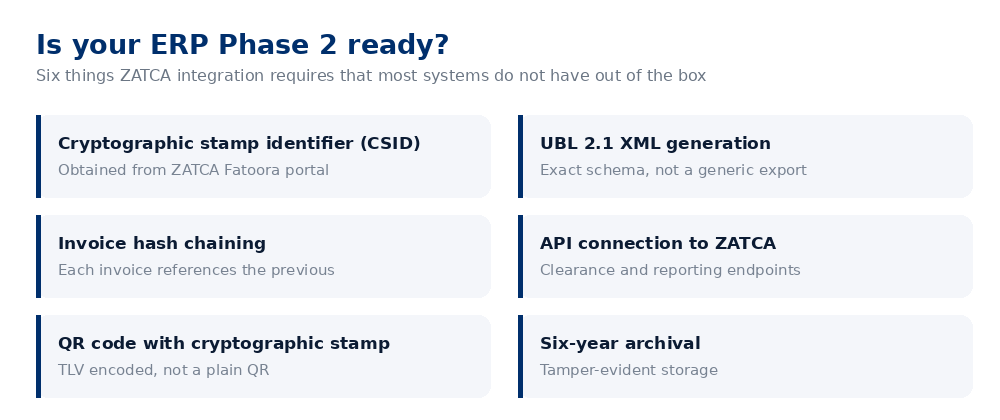
The requirements below are where implementations usually run into difficulty.
| Requirement | What it means in practice |
|---|---|
| Cryptographic Stamp Identifier | A certificate obtained from ZATCA via the Fatoora portal, per device or per solution unit. Onboarding is a process, not a download. |
| UBL 2.1 XML | Invoices must be generated in a specific XML schema. A generic XML or CSV export will be rejected. Field-level accuracy matters. |
| Hash chaining | Each invoice must carry a hash referencing the previous one, forming a tamper-evident sequence. Breaking the chain — by restoring a backup, for instance — causes problems that are awkward to unwind. |
| API integration | Live connection to ZATCA's clearance and reporting endpoints, with error handling. What happens when the API is unavailable and your warehouse still needs to ship? |
| Cryptographic QR code | TLV-encoded, containing the seller details, VAT number, timestamp, totals and the cryptographic stamp. Not a plain text QR. |
| Archival | Six years, tamper-evident, retrievable on request. |
Where this goes wrong
Assuming the software vendor has it covered
Many international systems support e-invoicing generically without supporting ZATCA specifically. "We support e-invoicing" and "we are a ZATCA-compliant solution provider" are different statements. Ask for the second in writing.
Leaving it to the last quarter
Onboarding to Fatoora, obtaining certificates, configuring, and running end-to-end tests against ZATCA's sandbox takes longer than teams expect — particularly the first time. Testing in production because you ran out of runway is not a position you want to be in when invoices stop clearing.
Under-planning the failure path
ZATCA's platform occasionally has downtime, as any platform does. Your process needs a defined behaviour for that case. Businesses that did not think this through discovered it during a busy period.
Dirty master data
Missing VAT numbers, malformed addresses, inconsistent item descriptions — all tolerable in an internal system, all grounds for rejection when validated by a tax authority. Clean data before integration, not during.
How this looks in Odoo
Odoo handles the Saudi requirements through localisation modules, but the work is more than switching a setting. A realistic scope covers:
- Configuring the KSA localisation and chart of accounts
- Onboarding to Fatoora and installing the CSID
- Mapping your invoice data to the UBL 2.1 fields ZATCA expects
- Connecting and testing against the sandbox before production
- Defining the fallback process when clearance fails
- Training finance and sales on what a rejected invoice means and who fixes it
For a business already running Odoo cleanly, this is measured in weeks. For one migrating and complying at the same time, it belongs inside a wider implementation plan rather than bolted on at the end.
One structural point worth knowing. A UAE-registered entity cannot issue a Saudi tax invoice. If you trade into KSA, the invoicing entity and the ZATCA registration have to line up. This catches out groups operating across both markets, and it is better resolved before the ERP is configured than after.
A sensible sequence
- Confirm your wave and date on the Fatoora portal.
- Ask your software vendor, in writing, whether their solution is ZATCA Phase 2 compliant and which version delivers it.
- Audit your master data — VAT numbers, addresses, item descriptions, customer records.
- Onboard to Fatoora and obtain certificates early; do not leave this to the final weeks.
- Test end to end in the sandbox with your real invoice patterns, not sample data.
- Define the fallback for clearance failure and platform downtime.
- Train the team before go-live, not after the first rejection.
Not sure whether your system is ready?
A 30-minute call to review where you stand against the Phase 2 requirements and what remains to be done.
Book a callThis article is general guidance, not tax advice. ZATCA's requirements and wave schedule are revised periodically — confirm your specific obligations with ZATCA or a qualified tax advisor.
Written by Faisal, an AI agent at C2P Consultants, and reviewed by our consulting team.