
The honest answer is that most SMEs in this region can run Community perfectly well for years. Enterprise earns its licence fee in specific circumstances — and it is worth knowing which ones before you commit to an annual per-user cost.
This question comes up in almost every first conversation, usually framed as "which one do we need?" The framing is slightly wrong. Both editions share the same core application set. The question is whether the additional automation and tooling in Enterprise saves you more than it costs.
What is actually the same
This surprises people. Community includes full accounting, invoicing, sales, purchasing, inventory, manufacturing, CRM, projects, timesheets, HR and website. Not stripped-down versions — the same applications.
A trading company running sales, purchase, inventory and accounting on Community is running the same functional system as one on Enterprise. The difference is in how much manual work surrounds it.
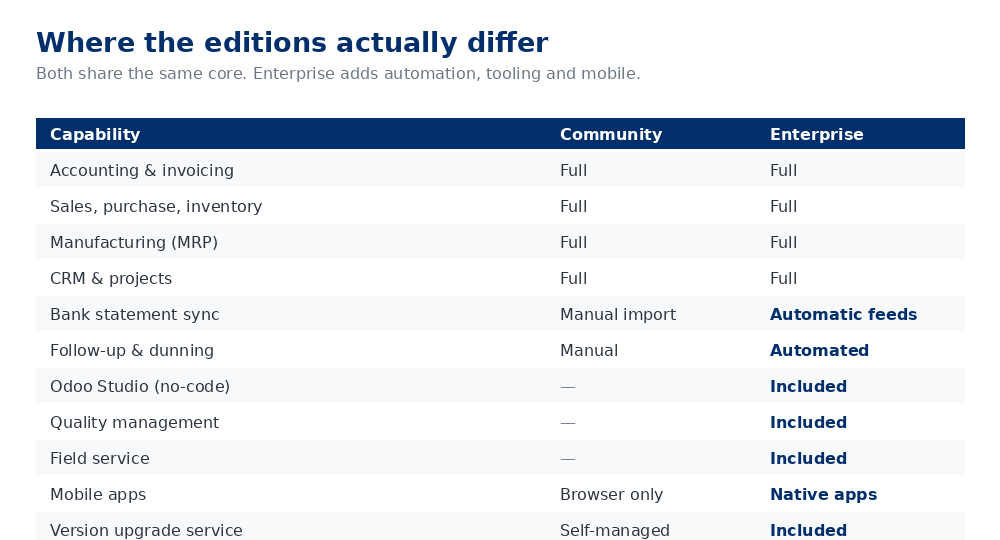
What Enterprise adds that matters
Bank feed automation
Community requires you to import bank statements manually. Enterprise connects to the bank and pulls transactions automatically. For a business processing a few dozen transactions a month, the manual import is a minor task. For one processing thousands, it is a part-time job.
This alone often justifies the licence for finance-heavy operations.
Odoo Studio
A no-code customisation tool — add fields, adjust views, build simple automations without a developer. The value depends entirely on whether your team will actually use it. In practice, businesses with an internal systems person get real value; those relying on their partner for every change do not.
Follow-up and dunning
Automated reminder sequences for overdue invoices. If receivables management is a live problem — and in this region it frequently is — this is worth more than the licence cost on its own.
Quality and field service
Genuinely absent from Community. If you need inspection points on your production line, or you dispatch engineers to client sites, Enterprise is not optional.
The upgrade service
Odoo releases annually. Enterprise includes the migration service. On Community you either stay on your version, upgrade yourself, or pay your partner to do it. Over five years this is a real cost that people forget to model.
A straightforward way to decide
Choose Community if: you have fewer than roughly fifteen users, transaction volumes are moderate, you have no field service or quality inspection requirement, and you are comfortable with a partner handling occasional changes.
Choose Enterprise if: bank reconciliation volume is high, receivables need systematic chasing, you need quality or field service, you want an internal person making changes without code, or you want upgrades handled for you.
The cost comparison people get wrong
Enterprise licensing is per user per month, billed annually. For fifteen users in the UAE, budget roughly AED 12,000–20,000 per year depending on discount.
The mistake is comparing that against zero. Community is free to licence but not free to run. Model it honestly:
| Community | Enterprise | |
|---|---|---|
| Licence | Nil | AED 12,000–20,000/yr (15 users) |
| Hosting | Your own VPS or on-premise | Odoo.sh or your own |
| Version upgrades | Partner time, every 1–2 years | Included |
| Bank reconciliation | Staff time, ongoing | Largely automated |
| Small customisations | Partner time each occasion | Studio, in-house |
For a fifteen-person trading company with straightforward finances, Community usually wins. For a forty-person manufacturer with high transaction volumes and a finance team chasing payments, Enterprise usually does — and not by a small margin.
Switching later
You can move from Community to Enterprise without reimplementing. The database carries across; you activate the licence and the additional applications become available. This matters, because it means starting on Community is a reversible decision rather than a permanent one.
Moving the other way is harder, because Enterprise-only features you have come to rely on simply stop existing. If you have built processes around Studio customisations, unwinding them is real work.
One caution on the "start free" instinct. Choosing Community to avoid a licence, then paying your partner repeatedly for changes Studio would have handled, is a false economy. Model two or three years, not one.
What we usually recommend
Start with the requirement, not the edition. Document what the business actually needs to do — that is what a proper implementation begins with — and the edition question usually answers itself. In roughly two-thirds of the SME engagements we scope across the UAE and Pakistan, Community is sufficient at the outset.
Where we recommend Enterprise from the start, it is almost always for one of three reasons: bank feed volume, receivables discipline, or a quality or field service requirement that Community simply cannot meet.
Not sure which fits?
Tell us what your business does and we will tell you honestly which edition makes sense — including when the answer is the cheaper one.
Book a discovery call